Building a Unified Agent Memory Fabric
Every AI agent I run had its own tiny kingdom. Hermes on local, Clawd on cloud, Machine on Discord, OpenCode in the terminal. Tell one agent a fact and the others would stare at you like goldfish in a hoodie.
The goal was simple: make the vault, semantic search, and episodic memory feel like one shared substrate across agents and devices.
The actual path was less elegant: LiveSync traps, CouchDB quirks, gbrain provider confusion, stale mem0 endpoints, OAuth that succeeded while returning nothing, and the ancient developer ritual of saying “this should only take 20 minutes” before donating an evening to infrastructure goblins.
The resolved architecture
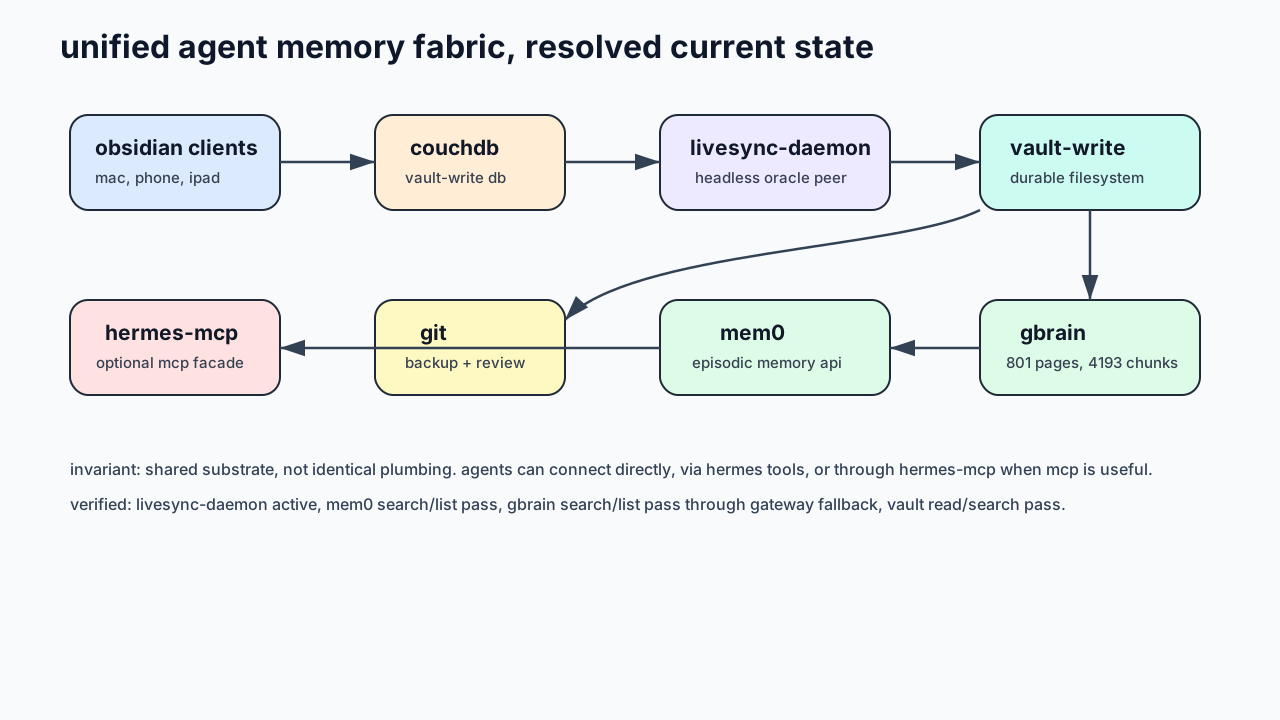
The invariant is shared state, not identical plumbing.
- Obsidian clients sync through CouchDB.
- A headless Self-hosted LiveSync daemon on Oracle materializes CouchDB state into a real filesystem vault.
- gbrain indexes that filesystem for semantic search and knowledge graph retrieval.
- mem0 stores episodic agent memory.
- hermes-mcp is optional glue for MCP-speaking clients that want one endpoint.
Agents do not all need to connect through the same MCP gateway. That was the first architectural correction. The shared substrate matters more than forcing every profile through one narrow pipe.
graph TB
    subgraph "Mac Host"
        POKE["Poke (personal AI)"]
        HERMES["Hermes Agent"]
        OC["OpenCode (coding)"]
    end

    subgraph "Oracle Cloud"
        CLAWD["Clawd (gateway agent)"]
        MACH["Machine (discord bot)"]
        POKE_C["Poke (cloud)"]
        OC_C["OpenCode (cloud)"]
    end

    subgraph "Real-Time Layer"
        CDB[CouchDB]
    end

    subgraph "Infrastructure"
        LS[LiveSync Daemon]
        FS[Vault Filesystem]
        GB[gbrain]
        M0[mem0 API]
    end

    subgraph "Gateway"
        HMC[hermes-mcp]
    end

    MAC[Mac Obsidian] --> CDB
    PHONE[Phone Obsidian] --> CDB
    IPAD[iPad Obsidian] --> CDB
    CDB --> LS
    LS --> FS
    FS --> GB

    HMC --> GB
    HMC --> M0

    POKE -.->|delegate| OC
    POKE --> HMC
    POKE_C --> HMC
    HERMES --> M0
    CLAWD --> M0
    OC --> HMC
    OC_C --> GB
    OC_C --> M0
Reference stack
| Component | Public reference | Role |
|---|---|---|
| Self-hosted LiveSync | https://github.com/vrtmrz/obsidian-livesync | Real-time Obsidian sync over CouchDB |
| CouchDB | https://couchdb.apache.org/ | Document database and changes feed |
| gbrain | https://github.com/garrytan/gbrain | Semantic search and knowledge graph over notes |
| mem0 | https://mem0.ai/ | Long-term memory layer for agents |
| Hermes Agent | https://hermes-agent.nousresearch.com/docs | Agent runtime and tooling layer |
| Model Context Protocol | https://modelcontextprotocol.io/ | Tool transport used by MCP clients |
The companion posts below cover each layer in detail — including the planning, smoke tests, and integration notes that shaped the build. All public references are linked; no private repo access is needed.
Build recipe
This is the reproducible version, minus the clown car.
1. Make the server vault the filesystem ground truth
Use one directory as the durable writable vault on the server:
/srv/vault-writeDo not point agents at LiveSync’s internal database directory. That directory is runtime state, not your vault.
2. Run CouchDB as the real-time transport
Git is great for snapshots, review, and backups. It is bad as a live event bus for mobile edits, cloud-agent writes, and cross-device sync.
CouchDB already has a changes feed. Use the boring tool built for the job.
3. Run Self-hosted LiveSync CLI headlessly
The working shape is:
node dist/index.cjs /srv/livesync-db --vault /srv/vault-write daemonImportant distinction:
/srv/livesync-db     # LiveSync runtime database
/srv/vault-write     # actual markdown vault
Mix those up and you get haunted filesystem behavior. Ask me how I know. Actually don’t, I’ll start twitching.
graph LR
    MAC -->|push| CDB[(CouchDB)]
    PHONE -->|push| CDB
    CDB -->|changes feed| MAC
    CDB -->|changes feed| PHONE
    CDB -->|changes feed| LS[Server Daemon]
    LS -->|write| FS[Filesystem]
    FS -->|read| GB[gbrain]
4. Index the vault with gbrain
gbrain reads the filesystem vault, not CouchDB directly.
After LiveSync materializes changes, run a full gbrain sync when needed:
gbrain sync --source vault-write --repo /srv/vault-write --no-pull --full --yes --skip-failedRun it with the same environment as the service. If your shell does not have the embedding provider key loaded, gbrain can fail even though the service path works.
5. Use mem0 for episodic memory
The vault is durable knowledge. mem0 is episodic agent memory: preferences, remembered facts, and conversational context that should survive sessions.
A useful split:
- Vault: plans, specs, durable notes, project docs.
- gbrain: semantic retrieval over the vault.
- mem0: remembered agent/user facts.
- Hermes skills: reusable procedures.
The self-hosted SDK trap
If you run your own mem0 instance, the mem0ai Python SDK (v2.x) is a cloud SDK, not a self-hosted client. It calls /v1/ping/ to validate keys and hits /v3/memories/add/ for writes. A self-hosted mem0 server exposes different paths: /memories and /search, and authenticates through the X-API-Key header instead of the cloud SDK’s Token scheme. The paths do not overlap. The auth does not match. The SDK will fail on init with a 404 before it ever tries to store anything.
The fix is to replace the cloud SDK calls with direct HTTP. The hermes mem0 plugin checks for a base_url config key: when present, it uses plain urllib.request calls against the self-hosted API; when absent, it falls back to the cloud SDK as usual. The plugin on the server was patched early. The plugin on my mac was not, which is how I learned this lesson in real time.
The config knob matters. The file $HERMES_HOME/mem0.json must use base_url, not host. A host key is silently ignored by the self-hosted branch, the plugin defaults back to the cloud SDK path, and you get a confusing “Invalid API key” error pointing at app.mem0.ai, because it was trying app.mem0.ai all along.
Namespace isolation matters
If you run multiple agent profiles against the same mem0 instance, set agent_id differently in each profile’s mem0.json. The plugin writes with user_id + agent_id as scoping filters and reads with user_id alone. That means agents share cross-session context under the same user, but each agent’s writes are attributed. My current setup: Oracle Hermes agents write as hermes, the mac personal assistant writes as poke, the default fallback profile writes as skynet. All under user goku. This is not configurable through env vars alone unless you source different values per-profile, which is exactly what the JSON file is for.
6. Add hermes-mcp where it helps
hermes-mcp exposes vault, gbrain, and mem0 tools behind one SSE MCP endpoint.
That is useful for MCP-speaking clients. It is not mandatory for every agent profile.
7. Wire OpenCode if you use it
OpenCode has its own MCP client. It reads mcpServers from the same opencode.json that declares your plugins. The config shape is the same as hermes: type, url, headers, which means the same SSE gateway you use for hermes profiles works for opencode agents too.
{
  "mcpServers": {
    "goku": {
      "type": "sse",
      "url": "https://mcp.goku.codes/sse",
      "headers": {
        "Authorization": "Bearer your-token-here"
      }
    }
  }
}
My opencode config now includes this block alongside the oh-my-openagent and opencode-plugin-openspec plugins. The agents defined in oh-my-openagent.json: sisyphus, prometheus, oracle, the juniors, can now call vault read, gbrain search, and mem0 add through the same gateway the hermes profiles use. No SSH, no local filesystem bridge, no second authentication flow.
This matters because opencode agents are high-call workers. They run on every coding session. If they need vault context or shared memory, routing them through the same mem0 pool and gbrain index keeps the whole fleet on the same ground truth without manual sync.
The gateway bugs
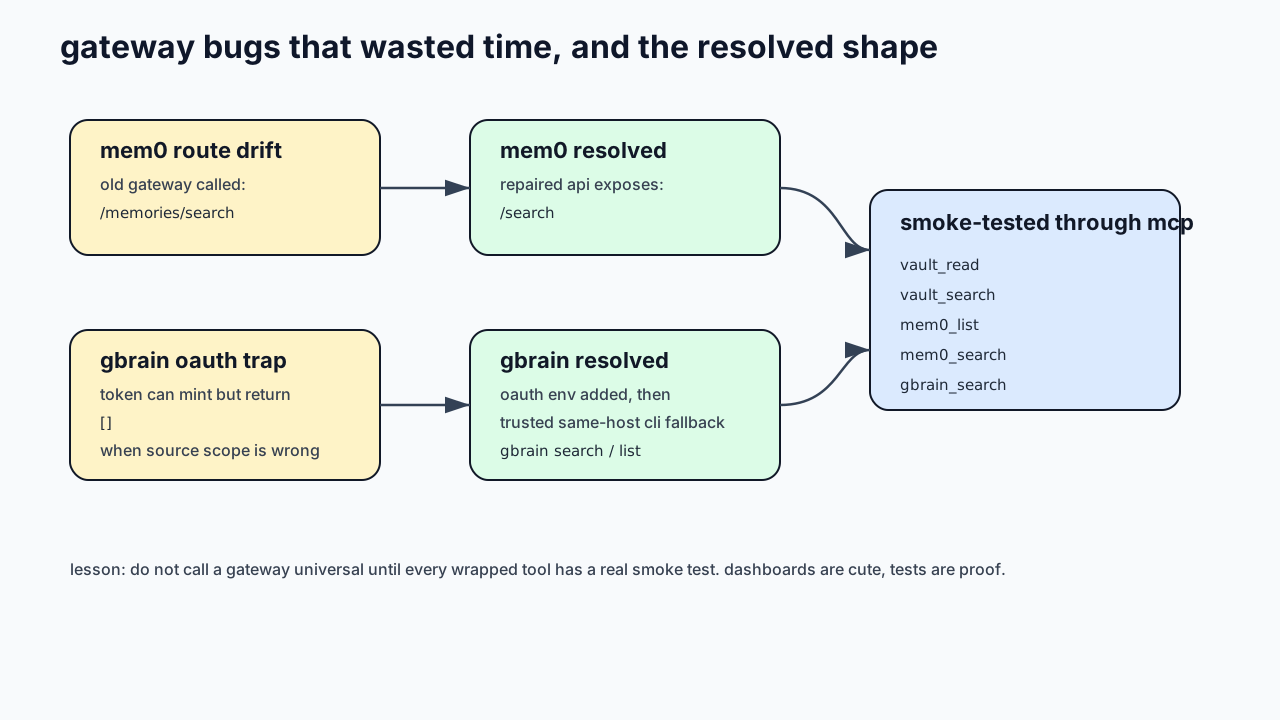
A few bugs made the gateway look healthier than it was.
mem0 route drift
The old gateway called:
/memories/searchThe repaired mem0 API exposes:
/searchSo mem0_list worked while mem0_search failed. Perfect little trap: one green checkmark, one broken core path.
gbrain OAuth scope trap
gbrain OAuth could mint a token successfully and still return empty results if the client was scoped away from the local source.
The practical same-host fix was:
- Add the gbrain OAuth env to the hermes-mcp service.
- Use OAuth first.
- If same-host OAuth returns an empty local-source view, fall back to the trusted local gbrain CLI.
For external clients, fix source scope properly. For a local Oracle gateway wrapping a local Oracle gbrain, the CLI fallback is pragmatic.
What went wrong
LiveSync hides important settings
When liveSync: true is enabled, the Obsidian UI can hide settings that still matter. Check the raw plugin JSON. Values like syncOnSave, syncOnStart, and background sync settings decide whether the server actually behaves like a live peer.
Git is not the sync layer
Using git as the primary sync path created lag and conflicts. It also trained the agents to think the repo state was the world state. It was not. CouchDB was the live state.
gbrain provider names matter
The openai: provider path uses the native OpenAI SDK. Do not assume OPENAI_BASE_URL will route it through OpenRouter.
Use an explicit provider name when routing through OpenRouter:
openrouter:openai/text-embedding-3-smallShell env and service env drift
A command can fail in your shell and work in a service because systemd has env vars your terminal does not. This is deeply boring and therefore guaranteed to steal hours.
Plugin version drift
The hermes mem0 plugin lives in the hermes-agent repo. But nothing forces every host to run the same revision. The oracle server had a patched plugin that used direct HTTP against the self-hosted mem0 API. The mac had the stock plugin that used the cloud SDK. Both were called “mem0.” Both loaded without errors. One worked, one returned “Invalid API key” that pointed at the wrong debugging target because the actual difference was in how they talked to the server, not which server they talked to.
This is the kind of problem that looks like a config issue, smells like a config issue, but is actually a code deployment gap. The fix was copying the patched plugin from oracle to mac. The lesson is: if two identical-looking configs produce different results, check whether the code that interprets the config is actually the same version on both hosts. It probably is not.
A gateway needs smoke tests, not vibes
If a gateway wraps thirteen tools, “the server is up” means almost nothing. Smoke test every wrapped tool:
vault_read
vault_search
mem0_list
mem0_search
gbrain_search
gbrain_list_pages
The gateway only became honest after those passed through the actual MCP client path.
Current live status
At the time of writing:
- The server vault is a dedicated filesystem directory, shown above as
/srv/vault-write. - The headless LiveSync daemon is active.
- The markdown vault was recovered back to roughly the expected file count after a bad deletion commit.
- gbrain indexes the vault as a knowledge layer.
- mem0 search and list work through the gateway and through the native hermes plugin on every host.
- OpenCode agents connect to the same MCP gateway and share the same mem0 pool and gbrain index.
- gbrain search and list work through the gateway.
- SVG diagrams are stored beside this post so the public blog can actually render them.
Why this matters
The win is not “one database for everything.” That usually turns into a shrine to future regret.
The win is a layered substrate:
- CouchDB handles live replication.
- The filesystem stays human-readable.
- Git gives history.
- gbrain gives semantic retrieval.
- mem0 gives episodic memory.
- Hermes exposes the right tools to the right agents.
Each layer does one job. The agents stop acting like isolated interns with amnesia. Everyone gets the same ground truth, without forcing every tool into the same transport.
That is the whole trick: shared substrate first, optional gateway second.
Companion posts
The unified memory build was too big for one post. These companions cover specific layers:
- unified-agent-memory-gateway-smoketest: smoke tests and failure modes for the MCP gateway wrapping vault, gbrain, and mem0
- unified-agent-memory-gbrain-mem0: deeper notes on the two memory layers: gbrain for vault retrieval, mem0 for episodic agent memory
- unified-agent-memory-headless-livesync: runbook for running Self-hosted LiveSync CLI as a headless server-side Obsidian peer
- unified-agent-memory-openspec-plan: the original proposal, design decisions, task breakdown, and phase-zero results
- unified-agent-memory-service-map: the server-side service map showing where the memory fabric fits among surrounding infrastructure